
Anonymous Browsing: Simple Ways to Protect Your Online Privacy
Anonymous browsing has become increasingly important as people spend more time online searching for information, shopping, communicating, and managing personal accounts. Every online activity can leave a digital footprint, allowing websites, advertisers, and other third parties to collect information about browsing habits and preferences.
Protecting your online privacy does not mean avoiding the internet; it means taking control of the information you share and limiting unnecessary tracking. With the right browser settings, privacy tools, and safe browsing habits, you can reduce your digital footprint and enjoy a more private online experience.
What Is Anonymous Browsing?
Anonymous browsing is the practice of accessing websites and online services while minimizing the information that can identify you or connect your browsing activities to your real identity. It involves using privacy settings, browser features, and specialized tools to reduce tracking and limit the collection of personal data.
Read More: Thehometrotters Homerepairs: Smart Tips for Home Repair and Maintenance
When you visit a website, your browser may share information such as your IP address, browser type, operating system, language preferences, and certain technical characteristics of your device. Websites can also use cookies, tracking pixels, and browser fingerprinting techniques to recognize returning visitors.
Anonymous browsing helps reduce some of these exposures. For example, a privacy-focused browser may block third-party tracking cookies, while a virtual private network (VPN) can hide your public IP address from the websites you visit by routing your traffic through a VPN server.
However, anonymous browsing does not automatically make every online activity untraceable. Signing in to a personal account, sharing your real name, or uploading identifying information can still reveal your identity. Effective privacy protection therefore combines suitable technology with careful online habits.
Why Is Anonymous Browsing Important?
Online privacy matters because personal information can be collected, analyzed, stored, and shared in ways that are not always obvious. Even ordinary browsing activities can contribute to a detailed profile of your interests and behavior.
1. Reduces Online Tracking
Many websites use advertising networks and analytics services to measure visitor behavior. These systems may record pages visited, links clicked, and products viewed. Some tracking technologies can connect activity across different websites.
Anonymous browsing techniques can reduce this tracking by blocking third-party cookies, limiting tracking scripts, and restricting access to certain browser data. This gives you more control over the information shared during your online sessions.
2. Protects Personal Information
Your browsing activity may reveal personal interests, professional concerns, shopping preferences, or other sensitive subjects. Although not every website collects the same information, limiting unnecessary data sharing can reduce the risk of unwanted profiling.
Privacy-conscious browsing is particularly helpful when researching sensitive topics or using devices that other people may access.
3. Improves Control Over Digital Identity
Your digital identity includes information associated with your accounts, devices, browsing behavior, and online interactions. When different services connect this information, they may build a broader picture of your activities.
Anonymous browsing helps separate some online activities from your primary identity. Using separate browser profiles, limiting account sign-ins, and avoiding unnecessary personal information can make this separation more effective.
4. Limits Certain Security Risks
Privacy tools can reduce exposure to malicious advertisements, suspicious tracking scripts, and some unwanted website technologies. However, privacy protection and cybersecurity are not identical. A private browser cannot guarantee protection against phishing, malware, fraudulent websites, or stolen passwords.
Combining privacy tools with updated software, strong passwords, and multifactor authentication provides a more effective approach to online safety.
How Different Browsing Methods Affect Your Privacy
Different privacy tools protect different parts of your online activity. Understanding these differences helps you choose the right method for your needs.
| Browsing method | Main privacy benefit | Important limitation |
| Private or incognito mode | Reduces local browsing history saved after a session | Does not hide your activity from websites, your network, or your internet provider |
| Privacy-focused browser | Can block trackers, restrict cookies, and reduce fingerprinting | Some websites may still identify you through accounts or other signals |
| Virtual private network (VPN) | Hides your public IP address from destination websites by using the VPN server’s address | The VPN provider can see certain connection information and may have access to metadata |
| Tor Browser | Routes traffic through the Tor network to improve anonymity | Some websites block Tor, and logging in can still identify you |
| Tracker-blocking extension | Blocks supported tracking scripts and advertising technologies | Cannot block every tracking method and may require careful configuration |
| Secure HTTPS connection | Encrypts data exchanged between your browser and the website | Does not hide all metadata or prevent the website from collecting information you provide |
1. Choose a Privacy-Focused Browser
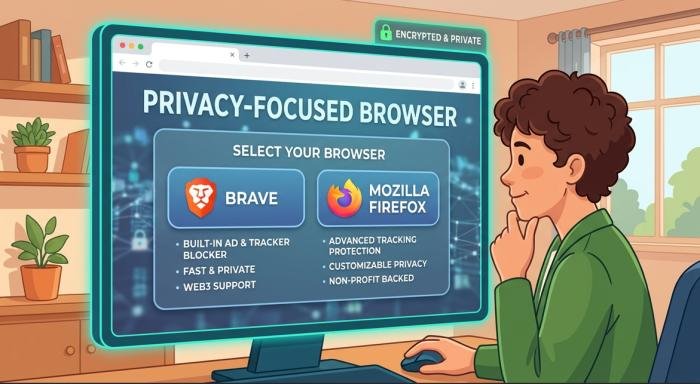
Your browser is one of the most important tools for anonymous browsing. It determines how websites interact with your device, how cookies are managed, and which tracking technologies are allowed.
Some browsers offer built-in tracker blocking, fingerprinting protection, automatic HTTPS upgrades, and controls for third-party cookies. These features can reduce the amount of information websites collect about your activity.
When selecting a browser, review its privacy policy and settings rather than relying solely on advertising claims. Consider whether the browser blocks trackers by default, how it handles browsing history, whether it offers automatic updates, and what information its developer collects.
2. Understand the Limits of Private Browsing Mode
Private browsing mode, commonly called incognito mode in some browsers, is useful for situations where you do not want certain browsing information retained on your device.
When you close a private session, the browser generally removes its session history and temporary cookies from that session. This can be useful when using a shared computer, testing a website without existing cookies, or signing in to a separate account.
However, private browsing does not make you invisible online. Websites can still receive your IP address, and network administrators or internet service providers may still be able to observe connection information. Downloaded files and bookmarks may also remain on your device.
3. Use a VPN to Hide Your IP Address
A virtual private network, or VPN, creates an encrypted connection between your device and a VPN server. When your traffic reaches a website through that server, the website generally sees the VPN server’s public IP address rather than your original public IP address.
Your IP address can provide information about your network and approximate geographic location. Hiding it from destination websites can reduce one way of identifying or profiling you.
However, a VPN does not eliminate all tracking. Websites may still recognize you through cookies, account logins, browser fingerprints, or information you submit. Your VPN provider may also be able to observe certain connection metadata, depending on its architecture and configuration.
4. Consider Tor Browser for Stronger Anonymity
Tor Browser is designed to improve anonymity by routing internet traffic through the Tor network. Rather than sending traffic directly from your device to a destination, Tor routes it through multiple volunteer-operated relays.
This design makes it harder for a single network observer to link your original IP address directly to your destination. Tor Browser also includes protections intended to reduce certain forms of tracking and browser fingerprinting.
Tor can be useful for journalists, researchers, people concerned about surveillance, and users who need stronger separation between their identity and browsing activity.
Nevertheless, Tor is not a guarantee of complete anonymity. Signing in to an account that identifies you, sharing personal information, or downloading and opening files in ways that connect to other applications can compromise privacy.
Some websites restrict Tor traffic or display additional security checks. Browsing may also be slower because traffic takes a more indirect route.
5. Manage Cookies and Website Tracking
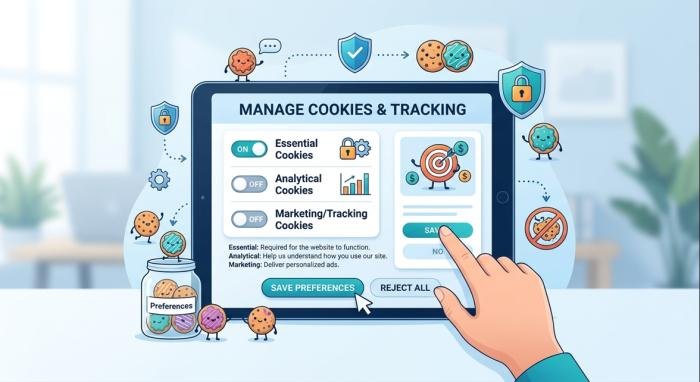
Cookies are small pieces of data that websites store in your browser. They support useful features such as keeping you signed in, remembering preferences, and maintaining shopping carts.
However, cookies can also be used to recognize visitors and track activity. Third-party cookies have historically played an important role in cross-site advertising and profiling.
You can reduce this type of tracking by blocking third-party cookies where practical. Many modern browsers provide controls that restrict them automatically or allow you to manage them through privacy settings.
Clearing cookies periodically can remove some stored tracking information, but it may also sign you out of websites and erase preferences. A balanced approach is to remove unnecessary site data while preserving information needed for services you trust.
6. Use Search Engines That Respect Privacy
Search engines can collect search queries, device information, IP addresses, and other technical data, depending on their policies and configuration. Search history may reveal personal interests, planned purchases, health-related questions, or work activities. A privacy-oriented search engine can reduce some forms of personal profiling.
Different providers use different methods, so review their privacy policies to understand whether they retain search records, use advertising profiles, or share data with third parties. You can also reduce exposure by avoiding unnecessary sign-ins and limiting personalized search features when privacy is your priority.
7. Avoid Signing In to Personal Accounts When Anonymity Matters
Account logins are one of the clearest ways websites connect activity to an identity. When you sign in to an email account, social network, or shopping service, the provider can generally associate your activity with that account. A VPN or private browsing window does not prevent this association. Even if your IP address is hidden, your account can still identify you.
If you want to separate a research session from your everyday activity, consider using a separate browser profile and avoiding personal account logins during that session. Be careful about account synchronization as well. Browser profiles linked to an account may synchronize bookmarks, browsing data, passwords, and other information across devices, depending on the settings you enable.
8. Use HTTPS and Secure Internet Connections
HTTPS protects the connection between your browser and a website by encrypting data in transit. It helps prevent people on the same network from reading or modifying the protected traffic.
When visiting a website, check that the address begins with HTTPS. Most modern browsers also support automatic HTTPS upgrades or warn users about insecure connections. HTTPS is important, but it does not make a website trustworthy by itself. Fraudulent websites can also use HTTPS. Always verify the domain name before entering passwords, payment information, or personal details.
Avoid conducting sensitive activities over unfamiliar public Wi-Fi networks when possible. If you must use public Wi-Fi, keep your software updated, prefer HTTPS websites, and consider a reputable VPN for additional protection against local network observation.
9. Reduce Browser Fingerprinting
Browser fingerprinting is a technique that attempts to identify or distinguish a browser using a combination of technical characteristics. These may include browser version, screen dimensions, operating system, language settings, graphics capabilities, and other signals. Unlike ordinary cookies, fingerprinting may work without storing a conventional tracking file on your device. This makes it harder to manage through cookie deletion alone.
To reduce fingerprinting, use a browser with built-in anti-fingerprinting protections. Avoid installing many unusual extensions or making unnecessary changes that create a distinctive browser configuration. Some privacy tools attempt to make different users’ browsers appear more similar, reducing the usefulness of unique characteristics. However, aggressive customization can sometimes make your browser more distinctive rather than less identifiable.
10. Limit Browser Extensions and Website Permissions
Browser extensions can improve productivity, block advertisements, manage passwords, and provide other useful functions. However, some extensions request access to browsing history, website content, or data entered into web pages. Before installing an extension, review its developer, reputation, permissions, and privacy policy. Choose established tools that request only the access needed to perform their advertised functions.
Remove extensions you no longer use. An extension that remains installed may continue to have access to information within the scope of its permissions. Website permissions also deserve attention. Many websites request access to your location, camera, microphone, notifications, or clipboard. These permissions may be necessary for certain services, but they should not be granted automatically.
11. Be Careful About What You Share Online
Technology cannot protect your anonymity if you voluntarily publish identifying information. Your name, home address, phone number, workplace, photographs, and personal stories may reveal your identity even when you use privacy tools. Small details can sometimes be combined to identify a person.
For example, a post mentioning your workplace, neighborhood, and daily schedule may expose more information than you intended. Before submitting a form, consider whether the requested information is necessary. Avoid sharing sensitive details with websites that have unclear privacy policies or questionable reputations.
When creating public profiles, limit unnecessary personal information and review the audience settings available on each service. Remove old public posts that reveal information you no longer want to share, where practical. Be particularly cautious when uploading photographs and documents. Files may contain metadata, such as timestamps or location information, depending on how they were created and processed.
12. Protect Your Device With Regular Updates
A secure device is an important part of anonymous browsing. Outdated browsers, operating systems, and extensions may contain vulnerabilities that attackers can exploit. Keep your operating system, browser, security software, and installed applications updated. Enable automatic updates where appropriate so that important security fixes are applied promptly.
Use a strong password or passphrase to protect your device, and enable device encryption when available. If other people use your computer, create separate user accounts instead of sharing one account with unrestricted access. Install applications from trusted sources and avoid suspicious downloads. Malware may capture keystrokes, steal session cookies, or monitor activity regardless of which privacy browser you use.
13. Create Separate Browser Profiles for Different Activities
Using separate browser profiles can help organize and isolate different parts of your online life. For example, you might maintain one profile for work, another for personal accounts, and a separate profile for general research. Each profile can have its own cookies, browsing history, saved sessions, and extensions. This reduces accidental mixing of accounts and browsing activity.
However, browser profiles do not necessarily hide your identity from websites or network providers. If you sign in to the same account across profiles, the service may still associate your activities.
Profiles are most useful when combined with thoughtful account separation and privacy settings. Avoid syncing profiles with the same account if that would undermine your intended separation. You should also review which extensions are enabled in each profile. An extension with broad permissions may collect information from the sites you visit in that profile.
14. Understand the Risks of Public Wi-Fi
Public Wi-Fi is convenient in airports, cafés, hotels, libraries, and other shared spaces. However, unfamiliar networks can expose users to risks such as deceptive Wi-Fi hotspots, insecure connections, and attempts to intercept unencrypted traffic.
Choose networks provided by legitimate businesses or organizations, and confirm the correct network name when possible. Avoid connecting automatically to unknown networks. HTTPS protects data exchanged with properly configured websites, but it does not eliminate every risk associated with public Wi-Fi. A VPN can provide an additional encrypted connection between your device and the VPN server.
15. Build a Practical Anonymous Browsing Routine
You do not need to change every browser setting at once. A simple routine can help you maintain privacy without making everyday internet use unnecessarily difficult. Start by selecting a browser with reliable privacy protections.
Review its tracking settings, block third-party cookies where practical, and remove extensions that you do not need. Use a reputable VPN when hiding your public IP address or protecting against local network observation is important. If your situation requires stronger network anonymity, consider Tor Browser and understand its limitations.
Before visiting a website, check its address and use HTTPS. Avoid signing in to personal accounts during sessions where you need to keep activities separate from your identity. Review website permissions regularly, particularly location access and notification permissions. Clear unnecessary cookies and site data when appropriate, and keep your software updated.
Finally, be mindful of the personal information you share. Avoid publishing identifying details, submitting unnecessary information, or downloading suspicious files.
Wrapping-Up
Anonymous browsing is a practical way to take greater control of your online privacy and reduce unnecessary exposure of personal information. By using privacy-focused browsers, managing cookies, blocking trackers, choosing secure connections, and being careful about what you share, you can make your everyday internet activities more private.
Although no single tool can guarantee complete anonymity, combining these methods can provide stronger protection against common tracking practices. Start with simple changes, stay informed about online privacy risks, and make secure browsing habits part of your daily routine.
FAQs
Q1. What is anonymous browsing?
Ans: Anonymous browsing is the practice of using privacy tools and browsing habits to reduce the information that websites, advertisers, and other third parties can use to identify or track you.
Q2. Does incognito mode make me anonymous online?
Ans: No. Incognito mode mainly prevents certain browsing information from being saved locally after you close the session. Websites can still see your connection information, and your internet provider or network administrator may still observe some activity.
Q3. Is a VPN enough for anonymous browsing?
Ans: A VPN can hide your original public IP address from destination websites and encrypt traffic between your device and the VPN server. However, it does not automatically prevent cookies, browser fingerprinting, account-based tracking, or identification through personal information.
Q4. Is Tor Browser better than a regular browser for anonymity?
Ans: Tor Browser is designed to provide stronger network anonymity by routing traffic through the Tor network. It can be useful when reducing the connection between your IP address and your browsing destinations is important.
Q5. Can websites track me when I use anonymous browsing tools?
Ans: Yes, depending on the tools and settings you use. Websites may identify visitors through account logins, cookies, browser fingerprinting, and information entered into forms. Privacy tools can reduce some tracking methods, but they cannot guarantee that every website will be unable to recognize you.
Q6. How can I improve anonymous browsing for free?
Ans: You can start by using a browser with built-in tracking protection, blocking third-party cookies, reviewing website permissions, removing unnecessary extensions, and avoiding personal account logins during sessions where anonymity matters. Keeping software updated and limiting personal information shared online can also improve privacy without requiring a paid service.
Q7. Is anonymous browsing legal?
Ans: In many countries, using privacy-focused browsers, VPNs, and other legitimate privacy tools is legal. However, laws and restrictions vary by location, and using these tools does not make illegal activities lawful. Check the rules that apply in your jurisdiction and follow the terms and laws relevant to your online activities.